

Overview
Monite aggregates the most popular payment methods and providers and allows you to define the right payment method for each transaction. This enables bill pay, invoice payment links, and other payments for the entity’s customers.The entity must be onboarded in order to accept payments.
Payment intent
The payment intent is the intention of a customer to execute a payment. In our system, a payment intent is an object that represents the payment itself. It is used to track the lifecycle of the payment flow. This gives you full control over the payment journey. A new payment intent is created automatically every time a payment link is created. The payment intent object can also be used to see the history of a specific payment.Payment intent lifecycle
Each payment intent is allocated with a status that indicates its progress throughout the payment lifecycle, from its creation until its conclusion.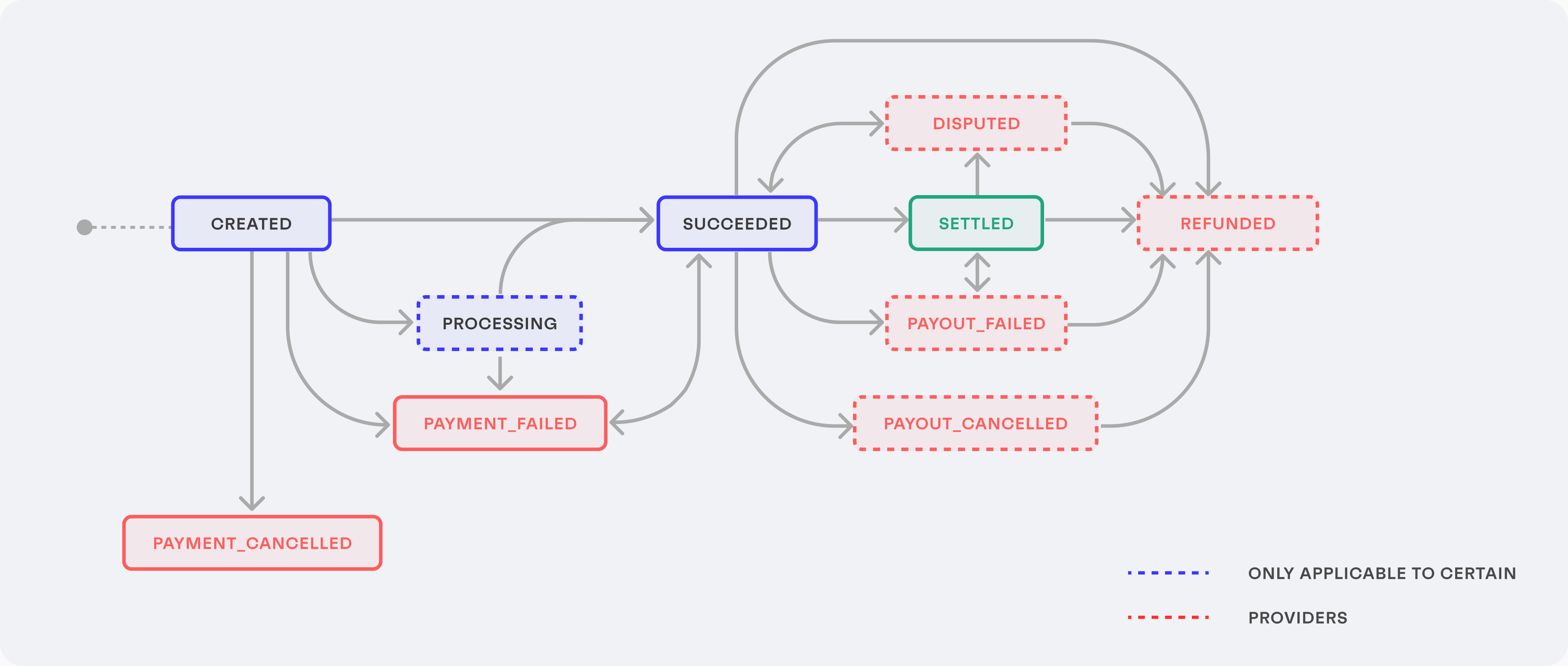
| Status | Description | Next status |
|---|---|---|
created | The initial status for all newly created payment intents. | processing,succeeded,payment_cancelled,payment_failed |
processing | The payer has accomplished the required actions for the payment on their side and the payment is being processed. Some payment methods, such as cards, can be processed very quickly, while other payment methods can take a few days. | succeeded,payment_failed |
payment_cancelled | A payment intent gets canceled when the associated payment link expires. Canceled payment intents cannot be used for future payment attempts. This is a final status. | |
payment_failed | The payment attempt failed for some reason. For example, the payer’s bank declined the transaction. | succeeded |
succeeded | The payment was successfully authorized and is ready to be settled. That is, the bank transfer can be initiated by the bank or the payout can be triggered to the recipient’s bank account. | settled,payment_failed,payout_failed,payout_canceled,disputed,refunded |
settled | The funds have been sent to the recipient’s bank account. | payout_failed,disputed,refunded |
payout_cancelled | The payout of funds to the recipient’s account was canceled. | refunded |
payout_failed | The funds could not be delivered to the recipient’s account. This can happen for various reasons, including (but not limited to):
| settled,refunded |
disputed | Occurs when a payer contests your charge with their bank for any reason. This status is only available for certain providers. | succeeded,refunded |
refunded | The payment that was previously processed has been refunded. Funds will be refunded to the credit or debit card or bank account that was originally charged. This is a final status. Refunds cannot be reversed once issued. |
When a settled payment intent linked to a specific accounts payable transitions to either
disputed or payout_failed, the corresponding payable status is changed according to this logic:- If
amount_paid = 0- the payable status changes towaiting_to_be_paid. - If
amount_paid > 0- the payable status changes topartially_paid. Theamount_paidfield will reflect the remaining valid payments.
Find an existing payment intent for an invoice
To check if there is an existing payment intent for a specific accounts payable or accounts receivable invoice, callGET /payment_intents?iobject_id=INVOICE_ID:
GET /payment_intents?object_id__in=INVOICE_1&object_id__in=INVOICE_2
The data array in the response contains all payment intents associated with the specified invoices.
- Check the payment status (
statusof the payment intent). - Find the payment link for the invoice: extract the
payment_link_idfrom the payment intent, then callGET /payment_links/{payment_link_id}, and get theurlfrom the response.
Track the payment intent
There are several ways to track the payment intent transition between statuses.Webhooks
You can subscribe to thepayment_intent.status_updated webhook to get notified of every change in the status of the payment intent. To subscribe to this webhook, call POST /webhook_settings with the following request body, replacing the url with the URL of your webhook listener endpoint:
entity_id, object_type, and object_id, which can be used to identify the affected payment intent:
Get information about the payment intent
The payment intent ID received from the webhook can be used to check the progress of the actual payment, by callingGET /payment_intents/{payment_intent_id}:
Get the payment intent history
You can check the full status transition history of a specific payment intent by callingGET /payment_intents/{payment_intent_id}/history: