

Overview
Creating e-invoices in Monite is similar to creating regular invoices, with a few key differences. One of the differences is that e-invoices go through additional statuses -issuing and (optionally) failed.
Only
draft and newly created invoices can be sent as e-invoices.
Already issued invoices cannot be re-sent as e-invoices.
However, issued e-invoices can be resent via email.Before you begin
This guide assumes that:- Both the entity (sender) and the counterpart (recipient) are from the supported countries.
- The entity has completed e-invoicing onboarding in Monite.
- Counterparts are already registered in the PEPPOL network through their access point of choice.
- The entity knows the counterpart’s PEPPOL ID.
How to create and send an e-invoice
The following diagram shows the basic flow of the e-invoice sending process in Monite: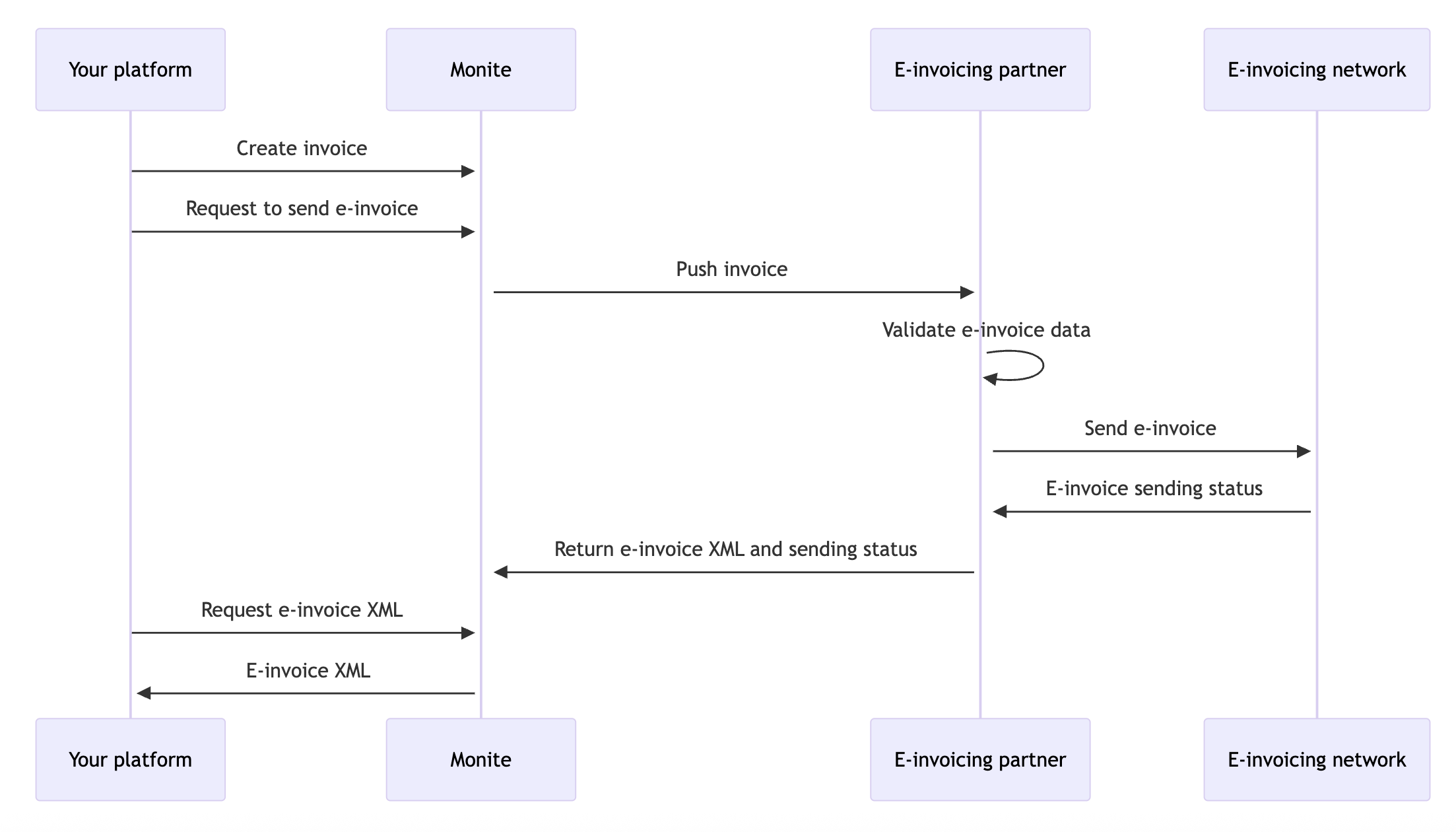
1. Specify the counterpart’s PEPPOL ID
Before creating an e-invoice, the entity needs to specify the PEPPOL ID of its counterpart. Counterpart PEPPOL IDs can be filled in even before the entity has completed e-invoicing onboarding. You can specify counterpart PEPPOL IDs in two ways: If a counterpart has several PEPPOL IDs with different schemes, you can add them all and later have the entity users choose the PEPPOL ID to send the e-invoice to.Specify PEPPOL ID directly
Companies usually share their PEPPOL IDs in the format<code>:<identifier>, such as 9930:DE087095777.
To add this identifier to a counterpart, do the following:
-
Split the string by
:.- The first element – a 4-digit number – is the scheme code. Use this table to convert this code to the scheme name.
- The second element is the identifier.
-
Call
POST /counterparts/. In the request body, provide the scheme name and identifier obtained on the previous step:/ einvoicing_credentials
In case of the
<country>:VAT schemes, the identifier value starts with a two-letter country prefix.
Do not remove this prefix.id assigned the counterpart’s PEPPOL ID.
Note down this id - you will need it later when creating e-invoices for this counterpart.
Add from VAT ID
If the counterpart has a VAT ID defined and you know that the counterpart is registered in PEPPOL using this VAT ID, you can send theid of the VAT ID object in the request to POST /counterparts/:
network_schema) of the PEPPOL ID from the country of the VAT ID object.
A successful response contains a Monite id assigned the counterpart’s PEPPOL ID.
Note down this id - you will need it later when creating e-invoices for this counterpart.
Counterpart PEPPOL ID validation
When you add a counterpart’s PEPPOL identifier, Monite validates the format and length of the specifiednetwork_identifier and checks if it is actually registered on the PEPPOL network.
If the specified identifier is not registered in PEPPOL or has incorrect length or format, you will receive an HTTP 409 error from POST /counterparts/.
Error examples
Error examples
Identifier is not registered in PEPPOL:Wrong identifier length or format:
2. Create an e-invoice
Create a new draft invoice in the usual way, but with the following additional fields:| Field | Description |
|---|---|
is_einvoice | Must be true. |
network_credentials_id | UUID of the entity’s PEPPOL identifier. |
counterpart_einvoicing_credentials_id | UUID of the counterpart’s PEPPOL identifier that you obtained previously. |
Notes
-
Entity address and VAT number that will be included in the e-invoice XML are taken from the entity’s e-invoicing registration (
/einvoicing_connections) and its PEPPOL identifier (network_credentials_id) rather than from the address and VAT ID of the entity object itself. -
While an invoice is still in the
draftstatus, you can change itsis_einvoicefield to turn e-invoicing on or off for this invoice.
3. Send an e-invoice
Before issuing an invoice, call
POST /receivables to make sure all required fields are filled in.POST /receivables/ to send the e-invoice through the e-invoicing network.
When an invoice has is_einvoice=true, the /receivables endpoint works as follows:
-
Monite checks again if the counterpart’s PEPPOL ID exists on the PEPPOL network.
If not,
/issuereturns an HTTP 409 error containing a substring “No action taken”. The invoice remains in thedraftstatus.Sample error if counterpart's PEPPOL ID is invalid
HTTP 409 error -
Monite checks if all data required for an e-invoice is filled in.
If not,
/issuereturns an HTTP 409 error and the invoice remains in thedraftstatus. Users can fill in the missing data and attempt to send the e-invoice again.Sample error in case of incomplete e-invoice data
HTTP 409 error -
If the previous checks succeed,
/issuereturns HTTP 200 OK. The invoice is moved from thedrafttoissuingstatus, and thereceivable.issuingwebhook is triggered. - Monite attemts to send the document to the counterpart through the e-invoicing network.
-
If the e-invoice is successfully sent (that is, successfully routed to the counterpart’s PEPPOL access point):
- Invoice status becomes
issuedand thereceivable.issuedwebhook is triggered. - The rest of the invoice lifecycle applies as usual.
- Invoice status becomes
-
If the invoice failed to be sent via e-invoicing:
- Invoice status becomes
failedand thereceivable.failedwebhook is triggered. - The error message from the e-invoicing network is saved to the
einvoice_error_commentfield of the invoice.
- Invoice status becomes
It may take a few minutes for an invoice to move from the
issuing status to issued or failed.View e-invoice XML
When an e-invoice or credit note gets issued, Monite generates the e-invoice XML document in the PEPPOL BIS Billing format and stores a link to this file ineinvoice_file_url field of the invoice or credit note.
This is the same XML document that gets sent to the counterpart over the e-invoicing network.
mail.attach_documents_as_pdf it true,
this XML file is also automatically attached to invoice and credit note emails sent by POST /receivables.
Credit notes and e-invoicing
Credit notes inherit e-invoicing details (such as the counterpart’s PEPPOL ID) from the invoice they are based on. If the original invoice was configured for e-invoicing delivery, the credit note will also be sent via e-invoicing, and vice versa. Like e-invoices, credit notes go through additional statuses when sent via e-invoicing.Test e-invoicing
In the sandbox environment, send e-invoices and credit notes to the following test counterparts:| Counterpart country | network_schema | network_identifier |
|---|---|---|
| Belgium | BE:EN | 0112233453 |
| Germany | DE:VAT | DE010101010 |
| Netherlands | NL:KVK | 012345677 |
| Netherlands | NL:VAT | NL000000000B45 |
Limitations
- The following invoice fields are not included in e-invoices:
- attachments
commercial_condition_descriptiondeductions,deduction_amount, anddeduction_memofootermemovat_exempt=falseandvat_exemption_rationalewithholding_tax_rate
- Units of measure in e-invoices are sent as the generic
C62code (“one”, “unit”) instead of the specific codes (such as hour, kg, or meter).