

Overview
Users can manually control the transit of a payable across its lifecycle by displaying approve/reject buttons to the approvers. The chart below shows all the different ways that a payable can transition from status to status: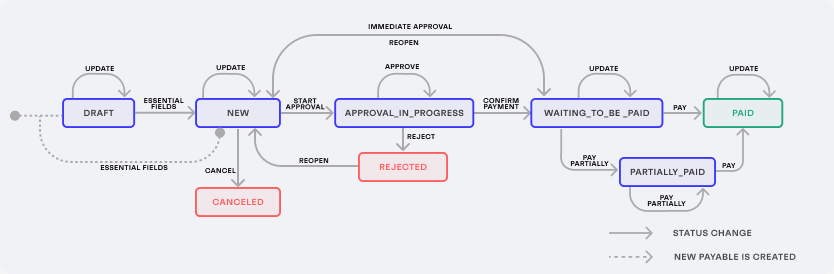
draft (if any of the essential fields are missing) or new (if the uploaded payable already contains all essential fields during its creation).
After a payable in the draft status has all essential fields filled out, its status automatically changes to new.
This payable then needs to go through additional approval statuses before it is cleared for payment:
approve_in_progresswaiting_to_be_paid
Cancel a payable
Current status:draft, new
A payable that is not confirmed during the entity user review can be canceled by sending a POST request to the /payables/{payable_id}/cancel endpoint:
To use the
/payables/{payable_id}/cancel endpoint with an entity user token, this entity user must have a role that includes the cancel permission.Start approval
Current status:new
After an uploaded payable has been validated, the approval process can be started by sending a POST request to the /payables/{payable_id}/submit_for_approval endpoint:
Confirm for payment
Current status:new, approve_in_progress
After the payable is approved by all the required approvers, it is ready to be sent for payment. To confirm that a payable is ready to be paid, send a POST request to the /payables/{payable_id}/approve_payment_operation endpoint:
Reject
Current status:approval_in_progress
If an approver finds any mismatch or discrepancies in the payable, they can decline it by sending a POST request to the POST /payables/{payable_id}/reject endpoint:
Reopen
Current status:rejected
A payable in the rejected status can be moved back to new. It makes it possible to fix any mismatch or discrepancies in the payable and then send it for approval again, repeating this process as many times as necessary.
To reopen a payable, send a POST request to the POST /payables/{payable_id}/reopen endpoint:
- To use the
/payables/{payable_id}/reopenendpoint with an entity user token, this entity user must have a role that includes thereopenpermission. - Reopening a payable triggers the webhook
payable.reopened.
Mark as partially paid
Current status:waiting_to_be_paid, partially_paid
If the payable is partially paid, its status is moved to partially_paid. To mark a payable as partially_paid, send a POST request to the /payables/{payable_id}/mark_as_partially_paid endpoint with the request body containing the new amount_paid (value of the partial payment, in minor units). The value of the amount_paid field must be the sum of all payments made, not only the last one:
amount_due field, which represents the remaining amount to be paid. This field is automatically calculated by the result of total - amount_paid:
- This endpoint can be used for payables in the
waiting_to_be_paidstatus. - The
amount_paidmust be greater than 0 and less than the total payable amount specified by theamountfield. - Make a
POSTrequest to/payables/{payable_id}/mark_as_paidto mark the payable as fully paid. - You can make
POSTrequests to/payables/{payable_id}/mark_as_partially_paidmultiple times for the same payable to reflect multiple partial payments, always setting the sum of all payments made. - To use the
/payables/{payable_id}/mark_as_partially_paidendpoint with an entity user token, this entity user must have a role that includes thepaypermission for payables. - The
amount_to_payfield is automatically calculated based on theamount_dueless the percentage described in thepayment_terms.discountvalue.
Mark as paid
Current status:waiting_to_be_paid
Payables can be paid using the payment channels offered by Monite or through external payment channels. In the latter case, the invoice is not automatically marked as paid in the system and needs to be converted to the paid status manually.
To mark a payable as paid, send a POST request to the /payables/{payable_id}/mark_as_paid endpoint. Optionally, it is possible to pass the comment field in the request body, to describe how and when the invoice was paid:
- To use the
/payables/{payable_id}/mark_as_paidendpoint with an entity user token, this entity user must have a role that includes thepaypermission for payables. - The
amount_to_payfield is automatically calculated based on theamount_dueless the percentage described in thepayment_terms.discountvalue.