

Update a quote
All newly created quotes start in thedraft status. You can edit draft quotes before issuing them to a counterpart.
To edit a draft quote, call PATCH /receivables/{receivable_id} with the updated fields in the request body. You can update counterpart data, quote memo, existing line items data, and other details.
counterpart_billing_address_id in the request body to update the counterpart_billing_address object.
Update quote line items
You can modify a quote’s line items to add, remove, or update the products and product details on the quote. To update a quote’s line item, send aPUT request to the /receivables/{receivable_id}/line_items endpoint. In the request body, use the data field to specify an array of the quote’s new line items.
Preview a quote’s email
After creating a quote, you can preview a quote’s email before issuing it. This step can be used when troubleshooting email template layouts for a quote to ensure that the final presentation aligns with your template design. To preview a quote’s template, make aPOST request to the /receivables/{receivable_id}/preview endpoint. The language field determines the language of the email template used to preview the quote. If a value is not provided, it defaults to en.
subject_text and body_text fields will replace the subject_text and body_template variables if they were used when creating your custom templates. For more information, see Create and manage email templates and Variables list.
Only quotes in the
draft and issued statuses can be previewed. Attempting to preview a quote in any other status will return a 409 Conflict error.Accept a quote
If the customer accepts the quote, callPOST /receivables/{quote_id}/accept to mark the quote as accepted:
GET /receivables?based_on=QUOTE_ID, where QUOTE_ID represents the ID of the accepted quote.
Accept a quote with a digital signature
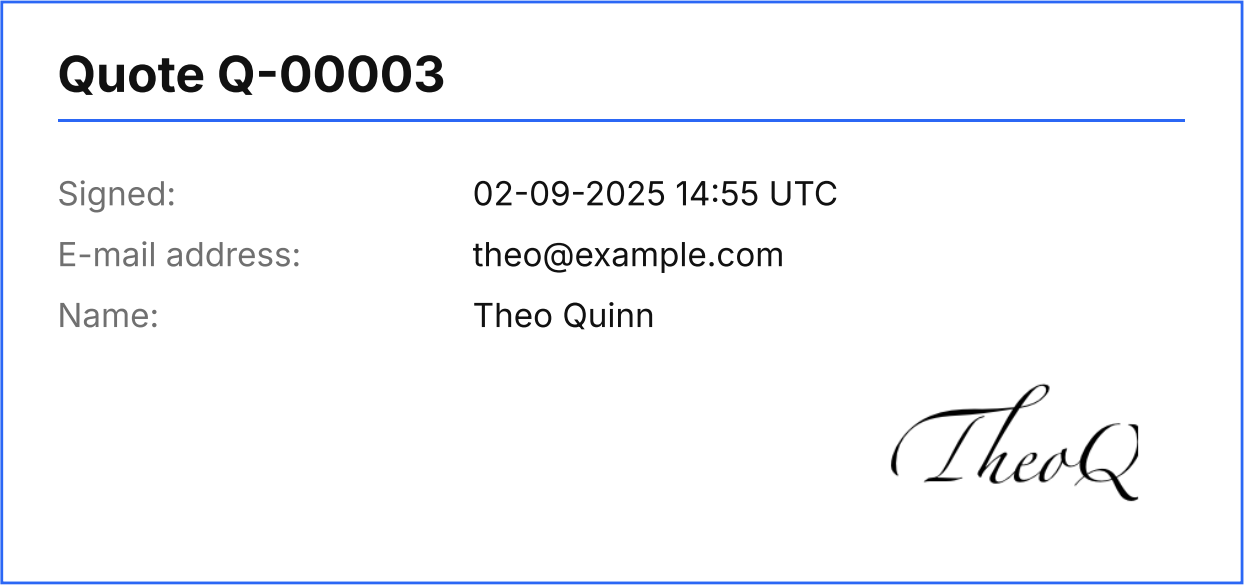
Entities can require that their customers provide a signature when accepting quotes. To do this, thesignature_required field in the quote object must be true.
When signature_required is true for a quote, a request to POST /receivables must include the signature object containing the signee’s email address, name, and signature image.
The signature_image field must be a Base64-encoded PNG image of the signee’s signature.
document_rendering is true, the PDF quote is automatically updated to include the signature specified when the quote was accepted.
This setting can be overridden for individual quotes.
Accept quotes using QR codes
The fieldquote_accept_page_url defines a link to a page that can be accessed to accept the quote. When quote_accept_page_url is specified, the quote will include a QR code representing the provided URL. Monite’s partners must implement and host this page on their side.
The default value of quote_accept_page_url is https://monite.com.
Decline a quote
If the customer declined the quote, callPOST /receivables/{quote_id}/decline to mark the quote as declined. As a best practice, customers should provide a reason why they declined the quote. This reason can be specified in the comment field in the request body. If no comment is available, you can omit the request body.
Customize quote numbering
Quote numbers are customized in the entity settings. Customizing a quote number will affect all quotes subsequently issued by the entity. Thedocument_id on previously issued quotes will not be affected by this change. To customize quote numbering, make a PATCH request to the /entities/{entity_id}/settings endpoint as shown:
Create an invoice based on the quote
If the customer accepts the quote, you can create an invoice based on this quote after the goods or services have been delivered. To create an invoice from a quote, callPOST /receivables and provide the quote ID in the based_on field in the request body:
based_on and based_on_document_id properties, respectively:
payment_terms_id- payment terms that define the invoice due date and, optionally, early payment discounts;entity_vat_id_id- entity VAT ID to be displayed on the invoice;payment_reminder_id- payment reminder configuration for this invoice. Required if entity settingreminder.enabledistrue.
For a complete list of fields that can be updated in draft invoices, refer to the description of the
PATCH /receivables/{receivable_id} endpoint.due_date field on the invoice response object.
Clone a quote
You can clone a quote of any status by sending aPOST request to the /receivables/{receivable_id}/clone endpoint. Cloning a quote copies the updated entity and counterpart information associated with the quote.
All newly cloned quotes will have a
draft status regardless of the status of the original quote they were cloned from. Therefore, all previously updated values related to issuing the original quote will be reset.Quote expiration
After a quote’sexpiry_date has passed, the quote status automatically becomes expired. Expired quotes cannot be accepted or declined. If needed, you can create a fresh quote for the same counterpart.
Delete a quote
Draft quotes can be deleted by callingDELETE /receivables/{receivable_id}. It’s important to note that this action is irreversible, and once deleted, the quotes can no longer be accessed.
Only quotes in the
draft status can be deleted successfully. Attempting to delete a quote with any other status will throw an error.List all quotes
To get a list of all quotes generated by an entity, callGET /receivables?type=quote:
GET /receivables endpoint.
Some examples:
GET /receivables?type=quote&counterpart_name=Acme%20Inc.- get all quotes issued to Acme Inc.GET /receivables?type=quote&amount__gte=15000- get all quotes where the total amount is €150 or more.GET /receivables?type=quote&status__in=draft&status__in=issued- get all draft and issued quotes.GET /receivables?type=quote&created_at__gte=2022-01-01T00%3A00%3A00- get all quotes created on or after January 1, 2022.
Retrieve a quote
To get information about a specific quote, callGET /receivables/{receivable_id} and provide the quote ID.
Find invoices created from a quote
To check if there are invoices created from a specific quote, callGET /receivables?based_on=QUOTE_ID:
data array in the response contains a list of related invoices, if any: